
Salesforce is widely adopted across enterprises, but the licensing model extends beyond base Sales Cloud or Service Cloud. Optional add-ons like Knowledge, CPQ, Field Service, and Agentforce can dramatically increase per-user spend. Business and IT leaders need a clear understanding of:
- What each add-on delivers in terms of value
- The actual cost impact per user or organization
- Which contract levers to negotiate for better terms
Failing to scrutinize add-on costs can lead to budget overruns, unnecessary complexity, and missed ROI.
Market Insights: Add-On Pricing Trends in Salesforce
- Core Sales or Service Cloud licenses start at $25/user/month for Starter suites, but quickly escalate through Professional, Enterprise ($165), to Unlimited ($330).
- CPQ (Configure-Price-Quote) add-on typically begins at $105/user/month. Advanced editions (CPQ+) can cost $210/user/month.
- Field Service add-on is priced around $220/user/month for Field Service Plus bundle. Entry tiers (Contractor, Technician) range from $50 to $150/user/month.
- Agentforce AI-based add-on is $125/user/month, while Agentforce 1 Editions (including AI and core license) can cost $550/user/month.
These prices represent significant uplift—often doubling or tripling the base license cost per user.
Breakdown of Leading Add-On Packs
Salesforce Knowledge
- Often bundled in higher-tier Service Cloud editions (e.g., Unlimited) or sold separately.
- Empowers self-service portals and knowledge management.
- Adds indirect value by reducing case volume and improving agent efficiency.
ROI consideration: Most impactful when deployed with mature support processes and content strategy.
Salesforce CPQ
- Priced at $105/user/month for standard, $210/user/month for advanced.
- Automates complex product configurations, pricing rules, and quote generation.
ROI consideration: High for organizations with large product catalogs, frequent customizations, or slow quote cycles.
Field Service (FSL)
- Field Service Plus includes mobile worker management, scheduling, and dispatcher tools ($220/user/month).
- Role-specific tiers for Contractors, Dispatchers, and Technicians can reduce per-seat cost.
ROI consideration: Justified when the field service model is mature and field operations are central to business performance.
Agentforce (AI Agents)
- $125/user/month for AI add-on, or $550/user/month for full edition.
- Includes predictive insights, generative case summarization, and workflow automation.
ROI consideration: Potentially high in high-volume service environments but requires disciplined tracking of AI credit usage.
Cost Modeling: Sample Scenarios
Example 1: Mid-market enterprise with 200 Sales Cloud Enterprise users ($165/user/month)
- Base license cost = $33,000/month
- CPQ for 50 users = $5,250/month
- Field Service for 30 technicians = $6,600/month
- Agentforce for 100 users = $12,500/month
- Total add-on spend = $24,350/month (≈74% uplift)
Example 2: Global enterprise with mixed deployment
- 500 Service Cloud Unlimited = $165,000/month
- Knowledge and Field Service bundled; CPQ and Agentforce as optional layers
- With 150 CPQ users and 200 Agentforce users, add-ons contribute $45,750/month
Annualized cost impact: Additional $500K-$1M/year in software expenses from add-ons alone.
Practical Guidance: What to Negotiate
Negotiating Add-On Pricing
- Volume Discounts: Push for scaled pricing as user volume increases.
- Pilot Programs: Request trial periods or POCs before full deployment.
- User-Type Licensing: Match user roles to lowest functional tier (e.g., use Technician instead of Plus).
- Flex Credits for AI: Rather than per-user pricing, negotiate a pool of Flex Credits tied to use cases.
Bundling Opportunities
- Negotiate a package discount for multi-product deployment (Sales + CPQ + Service).
- Leverage multi-year commitments for better pricing.
- Combine add-ons with Premier Success Plan for unified support.
Exit and Scope Controls
- Include mid-term adjustment clauses.
- Establish performance metrics (e.g., usage thresholds, ROI benchmarks).
- Use business reviews to evaluate renewal or downgrade.
Compliance and Risk Management
- Track utilization rigorously to avoid shelfware.
- Maintain documentation of license assignments and usage.
- Implement role-based access to ensure license alignment.
Strategic Framework for Add-On Evaluation
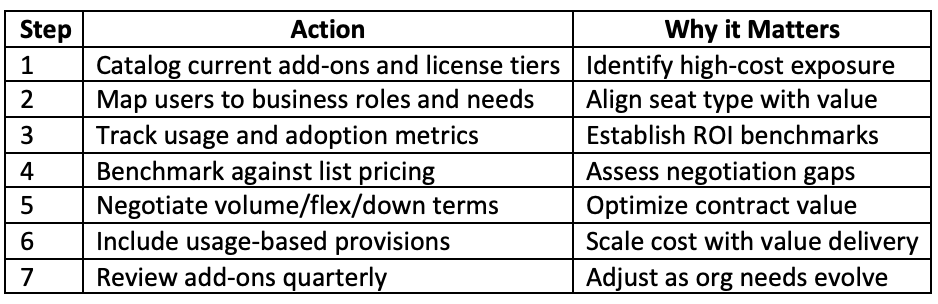
Why This Matters for Enterprise Teams
- Budget clarity: Add-on costs can account for 30-70% of total Salesforce spend.
- Strategic alignment: Focus on features that drive real business outcomes.
- Renewal leverage: Data-driven decisions strengthen negotiation stance.
- Operational efficiency: Eliminate unused features, reduce clutter, and improve user satisfaction.
Summary & Recommendations
Salesforce add-ons deliver powerful capabilities but often come at a steep price. Without clear governance, these features can quietly inflate software costs while delivering marginal value. IT, procurement, and legal teams must collaborate to:
- Regularly assess utilization
- Align licensing with roles and requirements
- Push back on per-user pricing when usage is limited
- Establish clear metrics for renewals
Action Plan:
- Audit all Salesforce add-ons today
- Review utilization vs license count monthly
- Use pilot outcomes and performance reviews in contract discussions
- Advocate for scaled pricing, bundling, and usage-driven models
Understanding the true cost of add-ons in Salesforce is essential to achieving both compliance and cost optimization.